CommMonitor - List View Function and Properties
CommMonitor - List View Functions and Features
The List View mainly displays the basic properties of IRPs, including serial port data packet sequence number, time, process, COM port, IRP function, data length, data (hex), string, and remarks.
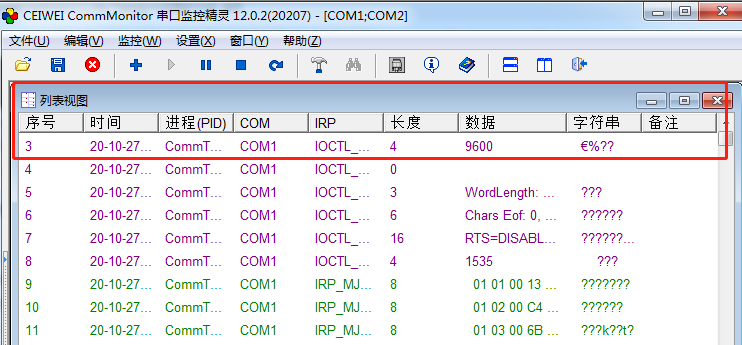
Packet No.: The index of the data packet obtained by the kernel monitoring driver. The index counts from the start of monitoring, resets to 0 when monitoring stops, and increments in ascending order.
Time: There are two recording methods, determined by the general settings. The default records the current time when the kernel captures the data packet. Alternatively, it can be set to record the time when the App reads it.
Process: The process (PID) in which the currently monitored serial port resides.
COM: The currently monitored serial port number.
IRP Function: The IRP function name. IRP_MJ_DEVICE_CONTROL is replaced by the sub-function name.
Length: The length of the data obtained by the currently monitored serial port.
Data: The data obtained by the currently monitored serial port, displayed in hexadecimal format.
String: Same as the previous column, but displays the data as characters.
Remark: Reserved.
