CEIWEI CommMonitor Serial Port Monitor v12.0

CEIWEI CommMonitor Serial Port Monitor is a professional and powerful system utility software for RS232 / RS422 / RS485 port monitoring. CEIWEI CommMonitor monitors, records and analyzes all serial port activities in the system without occupying the serial port. It is an ideal tool for tracking potential issues during application or driver development, serial device testing and optimization. It also provides filtering, search, data export and powerful data interception capabilities, allowing you to intercept and save data streams and control flow information from specified ports for analysis. You can view port status changes (baud rate, data bits, parity, stop bits), intercept upstream and downstream data with high speed and efficiency. Data can be displayed and output in hexadecimal, decimal, octal, and binary formats, while strings can be displayed in different encodings. Full support for Unicode/UTF8/UTF7 encoding/decoding of device data , and support for Modbus protocol analysis and parsing .
Buy on Taobao: Buy on Taobao 1
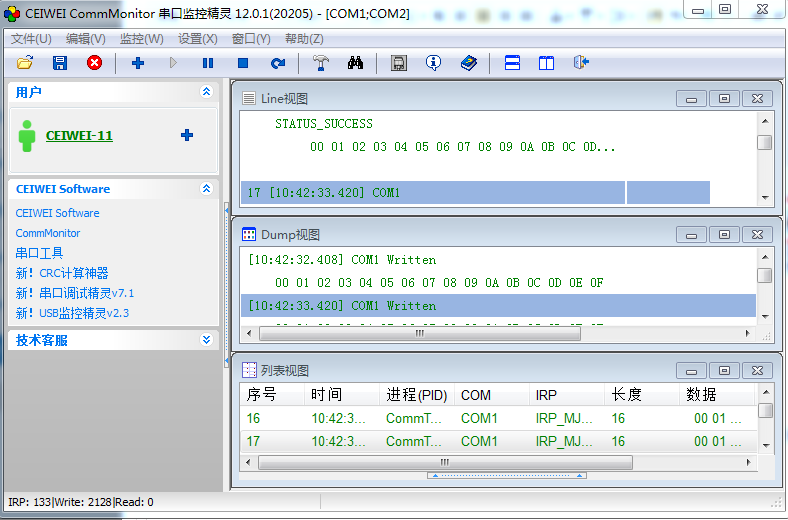
CommMonitor Key Features:
. Supports monitoring COM port types: standard PC ports, kernel virtual COM ports, Bluetooth serial ports, USB-to-Serial adapters, and more.
. Real-time monitoring and capture of serial port data.
. Simultaneous monitoring of multiple serial ports.
. Monitor serial ports that are already opened by other applications.
. Supports monitoring views: List View, Line View, Dump View, Terminal View, Modbus View.
. Supports monitoring all serial port Write/Read data streams.
. Supports monitoring all serial port IOCTL control codes with full request information and parameter tracking.
. Supports customizable view data display including colors, time format, byte line-break length, and different numeric base display/output.
. Supports monitoring session management: save and load all monitoring data, export and redirect to file.
. Supports exporting view data as ASCII text with automatic file redirection (Enterprise edition required).
. Copy all recorded data to clipboard.
. Supports synchronized linked display across List View, Line View, and Dump View.
. Supports custom IRP/IOCTL filtering tools.
. Supports serial port Modbus protocol analysis, supporting RTU and ASCII modes (Export, copy, and save data require Enterprise edition).
CommMonitor Use Cases:
. Monitor data transmission between serial devices and any Windows App communication.
. Monitor all serial devices connected to the PC, such as serial modems, serial barcode scanners, serial printers, etc.
. Debug communication control issues in serial RS232/422/485 processes.
. Kernel virtual serial port driver development and debugging.
. Serial port program and hardware development and debugging.
CommMonitor End Users
. Software programmers and testers
. Software quality control engineers
. Serial device system integrators
. Industrial control and SCADA design engineers
User Usage Restriction Statement:
This software, CEIWEI CommMonitor Serial Port Monitor, is a tool for software engineers to analyze and debug COM serial port communication for devices and software for which they have full intellectual property rights. It is used to verify the correctness of device-to-software COM serial port communication protocols and to troubleshoot erroneous COM serial port communication protocols. All users must not use it for illegal monitoring, cracking, or reverse engineering of third-party software (software and devices for which they do not have full intellectual property rights) COM serial port communication protocols. Any losses or legal liabilities caused to third-party software as a result of such violations shall be borne by the user and are unrelated to this software, CEIWEI CommMonitor Serial Port Monitor.
12.0 Changelog
1. Added Terminal View, Modbus View, and LineView functions.
2. Added Modbus RTU/ASCII protocol analysis.
3. Added data encoding/decoding, supporting: ANSI, Unicode/UTF7/UTF8.
4. Added file output redirection for different views.
5. Added Save As for view data.
6. Added monitoring session functionality.
7. Added large data caching support.
8. Added view function settings.
9. Added show/hide column controls for view data.
10. Added data display/output in different numeric bases (2,8,10,16).
11. Added string output length setting for Line View and Dump View.
12. Added packet sequence number (#) display/output for Line View and Dump View.
13. Added synchronized linked display across List View, Line View, and Dump View.
Download: Local Download Huajun Download
