CommTone Serial Debug Tool - Login and Connect to Serial Port
CommTone Serial Debug Tool - How to Create a New Debug Port?
1. Open Menu -> Edit -> [New Port] or click the toolbar [+] button to create a new port. The toolbar has a dropdown menu for creating: Serial Port, Frame Collection Packet, TCP/UDP.
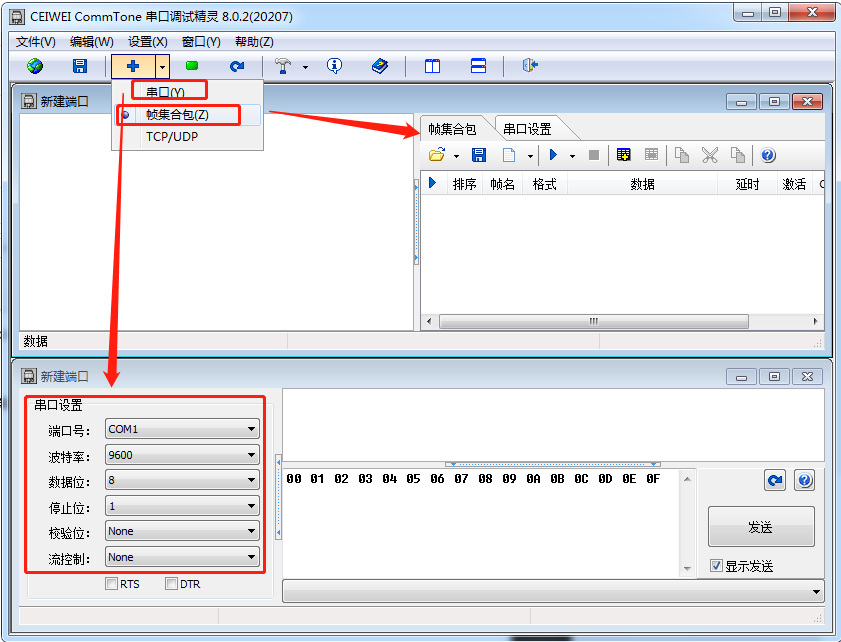
2. New Port Descriptions:
Serial Port: A simple serial port command debugging tool. You can configure serial port parameters, auto-send data, support hexadecimal and string send/receive, auto-insert CRC checksum values, and support CRC result MSB/LSB byte order swapping.
Frame Collection Packet: Serial port data frame debugging tool. You can configure serial port parameters, auto-send data, support hexadecimal and string send/receive, support custom data frames, batch sending, auto-insert CRC checksum values, and support CRC result MSB/LSB byte order swapping.
TCP/UDP: Network socket debugging tool
