CommMonitor - How to Monitor Computer Serial Ports?
CommMonitor How to Monitor Computer Serial Ports?
1. Create or Open a Monitoring Session
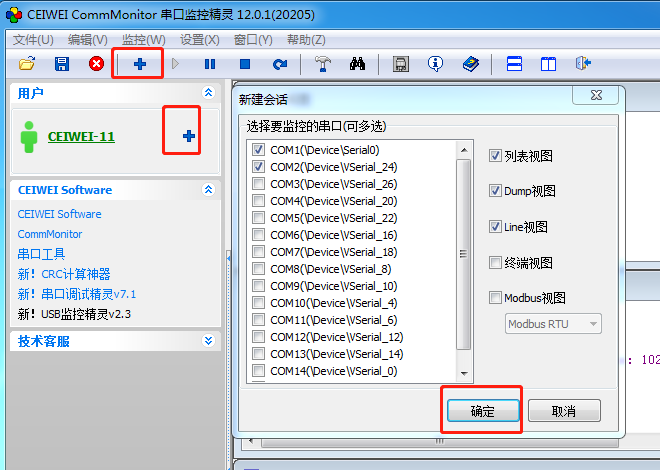
Open CEIWEI CommMonitor software, click the [+] button on the toolbar to add a new monitoring session, then proceed to the New
Monitoring dialog -> select the serial port to monitor -> select the data view, then click [OK].
2. Serial Port Selection for Monitoring - Supports simultaneous monitoring of multiple serial ports, as shown below
3. View Window Descriptions
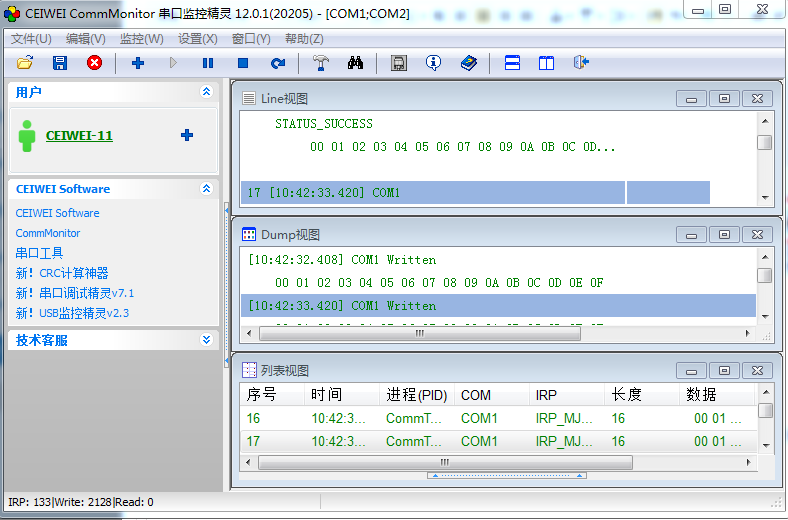
a) List View: Displays monitored serial port IRP data in a list/column format.
b) Dump View: Displays monitored serial port IRP data in dump format.
c) Line View: Shows detailed information about serial port IRP Function requests.
d) Terminal View: Displays monitored serial port IRP data as text console output strings.
e) Modbus View: Analyzes monitored serial port data using Modbus protocol and displays it in a recognizable protocol format, supporting RTU and ASCII modes.
4. Click the [OK] button to start a new monitoring session.